 mehul.pattel
- 📋 Income Certificate (આવકનો દાખલો) શું છે?
- 🌐 ઓનલાઈન અરજી ક્યાં કરવી? (Portal Details)
- 📝 જરૂરી Documents (Required Documents)
- 🖥️ ઓનલાઈન અરજી કેવી રીતે કરવી? (Step-by-Step Process)
- 🔍 Application Status Track કેવી રીતે કરવો?
- ⬇️ Certificate Download કેવી રીતે કરવો?
- 📍 Offline / CSC (Common Service Centre) Option
- ⏰ Processing Time અને Validity
- ❓ FAQ — વારંવાર પૂછાતા સવાલો
- 🎯 નિષ્કર્ષ (Conclusion)
શું તમે ઘરે બેઠા Aavak no Dakhlo (Income Certificate) કઢાવવા માંગો છો? ભૂલી જાઓ તલાટી ઑફિસના ચક્કર! Gujarat સરકારે Digital Gujarat Portal અને e-Dharti Portal દ્વારા આ સેવા 100% Online કરી દીધી છે. આ Article માં અમે સ્ટેપ-બાય-સ્ટેપ સમજાવીશું — Documents થી Fees સુધી, Certificate Download સુધી!
—
📋 Income Certificate (આવકનો દાખલો) શું છે?
Income Certificate એ Government દ્વારા Issue થતો Official Document છે જે Confirm કરે છે કે અરજી કરનારની Annual Family Income કેટલી છે.
આ Certificate ઘણી જગ્યાએ જરૂરી પડે છે:
- 🎓 Scholarship — School/College Scholarship માટે
- 🏠 EWS/OBC Reservation — Admission/Job Reservation Benefit
- 🏥 Government Health Schemes — Ma Vatsalya Yojana, Ayushman Card
- 💰 Bank Loan Subsidy — Mudra Loan, PM Awas Yojana
- 📄 Government Forms — અનેક સરકારી અરજીઓ
Pro Tip: Income Certificate ની Validity સામાન્ય રીતે 1 વર્ષ (12 Months) ની હોય છે. Expiry પહેલાં Renewal કરાવો.
—
🌐 ઓનલાઈન અરજી ક્યાં કરવી? (Portal Details)
Gujarat માં Income Certificate Online કઢાવવા માટે Digital Gujarat Portal (www.digitalgujarat.gov.in) Official Platform છે. આ Portal e-Dharti System સાથે Integrated છે.
Portal Visit કરવા 2 Options:
- Direct URL: digitalgujarat.gov.in
- Mobile App: Digital Gujarat App (Google Play Store / Apple App Store)
Pro Tip: Mobile App વાપરવી સૌથી Easy છે — Anytime, Anywhere Application Submit કરી શકો.
—
📝 જરૂરી Documents (Required Documents)
Application Submit કરતાં પહેલાં આ Documents Scan/Photo Ready રાખો:
| ક્રમ | Document | નોંધ |
|——|———-|——|
| 1 | આધાર કાર્ડ (Aadhaar Card) | Mandatory |
| 2 | રેશન કાર્ડ (Ration Card) | Family Details માટે |
| 3 | 7/12 ઉતારો | ખેડૂત હોય તો |
| 4 | Salary Slip / Form 16 | Salaried Employee માટે |
| 5 | Self Declaration Form | Income Details |
| 6 | Passport Size Photo | Applicant ની |
| 7 | Mobile Number (OTP) | Aadhaar-linked |
Pro Tip: બધા Documents JPG/PDF Format માં 200KB થી ઓછા Size માં Scan કરો — Upload Easy રહેશે.
—
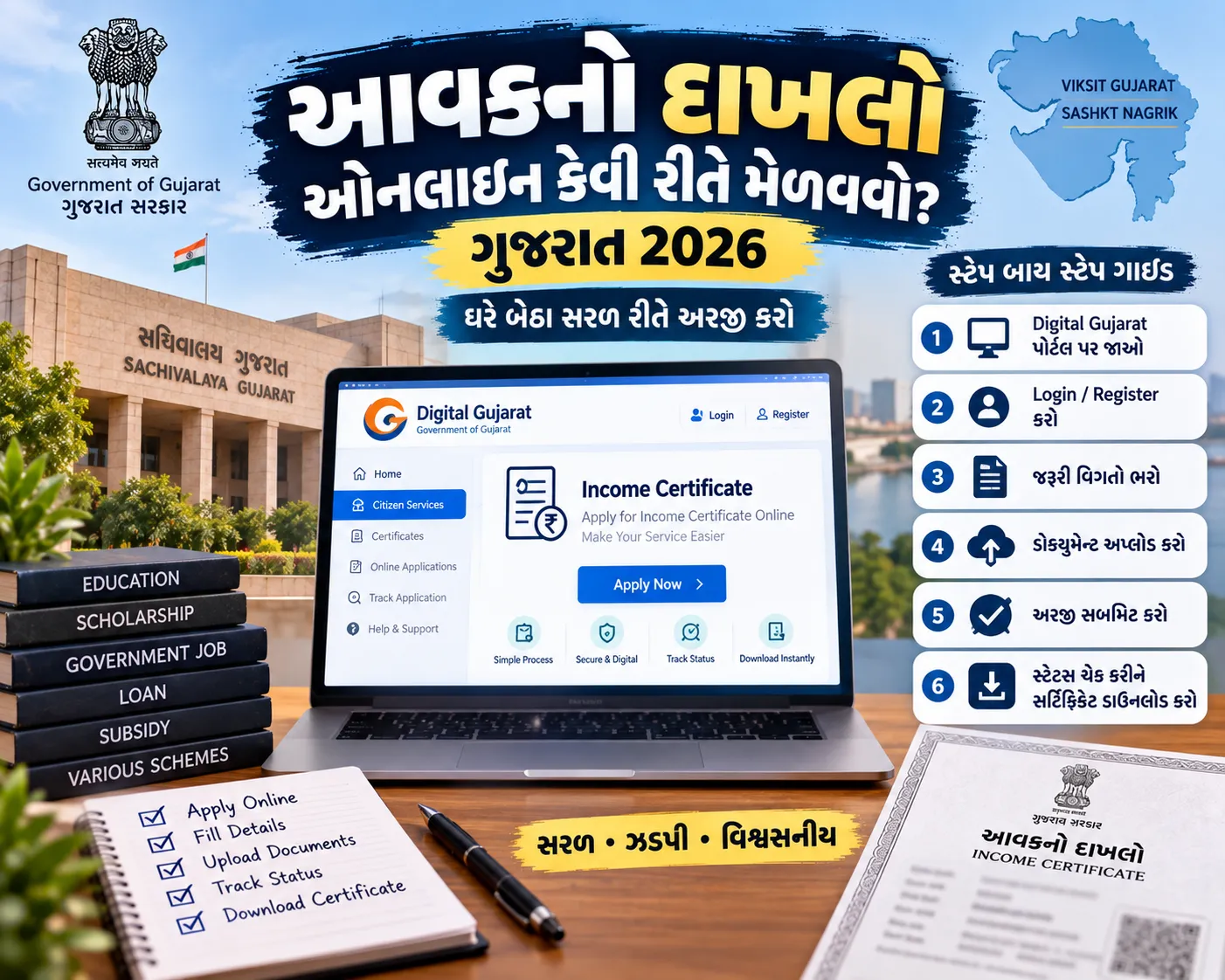
🖥️ ઓનલાઈન અરજી કેવી રીતે કરવી? (Step-by-Step Process)
Step 1 — Digital Gujarat Portal Open કરો
Browser માં www.digitalgujarat.gov.in Type કરો. Home Page પર Citizen Services Option Click કરો.
Step 2 — Registration / Login
- New User? Register Button Click કરો
- Mobile Number Enter કરો, OTP Verify કરો
- Password Set કરો અને Account Create કરો
- Existing User? Mobile Number + Password થી Login કરો
Step 3 — Income Certificate Service શોધો
Login પછી Search Bar માં Income Certificate અથવા આવકનો દાખલો Type કરો. Service List માં Income Certificate (Aavak no Dakhlo) Option Select કરો.
Step 4 — Application Form ભરો
Online Form માં નીચેની Details ભરો:
- Applicant Name (Aadhaar Card પ્રમાણે)
- Father/Husband Name
- Date of Birth
- Address (Village/City, Taluka, District)
- Annual Family Income (Rupees માં)
- Purpose of Certificate (Scholarship, Loan, etc.)
- Mobile Number & Email ID
Pro Tip: Annual Income ભરતી વખતે Family ની Total Income ભરો — ખેતી, Job, Business — બધી Income Count થાય.
Step 5 — Documents Upload કરો
Form ભર્યા પછી Documents Upload Section આવશે. Aadhaar Card, Ration Card, Income Proof (Salary Slip / 7-12) અને Passport Photo Upload કરો.
Step 6 — Application Fee ભરો
Income Certificate ની Fee માત્ર ₹20 (Rupees Twenty Only) છે.
Payment Methods:
- Debit/Credit Card
- Net Banking
- UPI (Google Pay, PhonePe, Paytm)
Payment Complete થયા પછી Transaction Receipt Save કરો.
Step 7 — Submit and Application Number Note કરો
Submit Button Click કરો. System Automatically Application Reference Number Generate કરશે.
આ Number ખૂબ Important છે! — Status Check અને Certificate Download માટે જોઈશે. SMS/Email Confirmation પણ આવશે.
Pro Tip: Application Number Screenshot અથવા Notepad માં Save કરી લો.
—
🔍 Application Status Track કેવી રીતે કરવો?
Certificate Approve થવામાં 3 થી 7 Working Days લાગે છે.
Status Check Process:
- digitalgujarat.gov.in Open કરો
- Login કરો
- Track Application Option Click કરો
- Application Reference Number Enter કરો
- Current Status જુઓ
Status Types:
- 🟡 Pending — Application Review Under Process
- 🟢 Approved — Certificate Ready to Download
- 🔴 Rejected — Reason Check કરો, Re-apply કરો
—
⬇️ Certificate Download કેવી રીતે કરવો?
Status Approved થઈ જાય પછી:
- Digital Gujarat Portal Login કરો
- My Applications Section Open કરો
- Approved Application Select કરો
- Download Certificate Button Click કરો
- Certificate PDF Format માં Download થશે
Downloaded Certificate Digitally Signed (Government Seal + QR Code) હોય છે — Court / School / Bank — ક્યાંય Valid!
Pro Tip: Certificate Print કર્યા પછી A4 Paper પર Color Print કઢાવો. QR Code Scan થઈ Online Verify થઈ શકે.
—
📍 Offline / CSC (Common Service Centre) Option
Internet Access ન હોય અથવા Online Process Difficult લાગે, તો:
- નજીકના CSC (Jan Seva Kendra) જાઓ
- Village Talati / Mantri ઑફિસ Visit કરો
- E-Gram Vishwa Gujarat Centre નો ઉપયોગ કરો
CSC Centre ₹20 Government Fee + ₹25-50 Service Charge સાથે Application Submit કરી આપે.
—
⏰ Processing Time અને Validity
| વિગત | Time / Details |
|——|—————-|
| Online Processing Time | 3-7 Working Days |
| Offline Processing Time | 7-15 Working Days |
| Certificate Validity | 1 Year (12 Months) |
| Government Fee | ₹20 |
| Appeal Period (Rejection) | 30 Days |
—
❓ FAQ — વારંવાર પૂછાતા સવાલો
Q1. Income Certificate ઓનલાઈન Free છે?
Ans: ના, Government Fee ₹20 છે. CSC Centre થી ₹50-70 Extra ચૂકવવા પડી શકે.
Q2. Certificate ક્યારે Expire થાય?
Ans: Issue Date થી 12 Months (1 વર્ષ) પછી Certificate Expire થઈ જાય. Renewal ફરી Online Apply કરીને મળે.
Q3. Application Reject થઈ તો શું કરવું?
Ans: Rejection Reason Portal પર Show થશે. Documents Correct કરીને ફરી Apply કરી શકો. Re-application Fee ₹20 ફરી ચૂકવવી પડે.
Q4. શું Family ના દરેક Member ને Certificate ની જરૂર છે?
Ans: ના, Head of Family ના નામ પર Family Income Certificate Issue થાય — Family ના બધા Members ને Valid.
Q5. Aadhaar Card Linked Mobile Number ન હોય તો?
Ans: Application Submit Aadhaar OTP Verify વગર ન થઈ શકે. UIDAI Website અથવા Nearest Aadhaar Centre પર Mobile Number Update કરો.
Q6. Certificate Urgent જોઈએ — Tatkal Option?
Ans: Extra Fee (₹50-100) સાથે Tatkal Service ઉપલબ્ધ છે — 1-2 Working Days માં Certificate મળી શકે. CSC Centre ખાતે Tatkal Request કરો.
Q7. Certificate Download ન થાય તો?
Ans: Portal Helpdesk: Toll Free 1800-233-5500 અથવા support@digitalgujarat.gov.in ઈ-મેઈલ કરો.
—
🎯 નિષ્કર્ષ (Conclusion)
Income Certificate (Aavak no Dakhlo) Online મેળવવું — Digital Gujarat Portal ના આભારે — ખૂબ સરળ છે. માત્ર ₹20 ની Fee, 10 Minutes ની Online Form, 3-7 Days Processing — અને Certificate ઘરે બેઠા Download!
GujjuFanClub.com ના આ Guide ને Follow કરો, Documents Ready રાખો, અને Certificate Download કરો. Share કરો — Friends/Family ને Help કરો!
—
*Article By: GujjuFanClub Team | Last Updated: September 2026*